
Tech
What Is SFM Compile? Everything You Need to Know

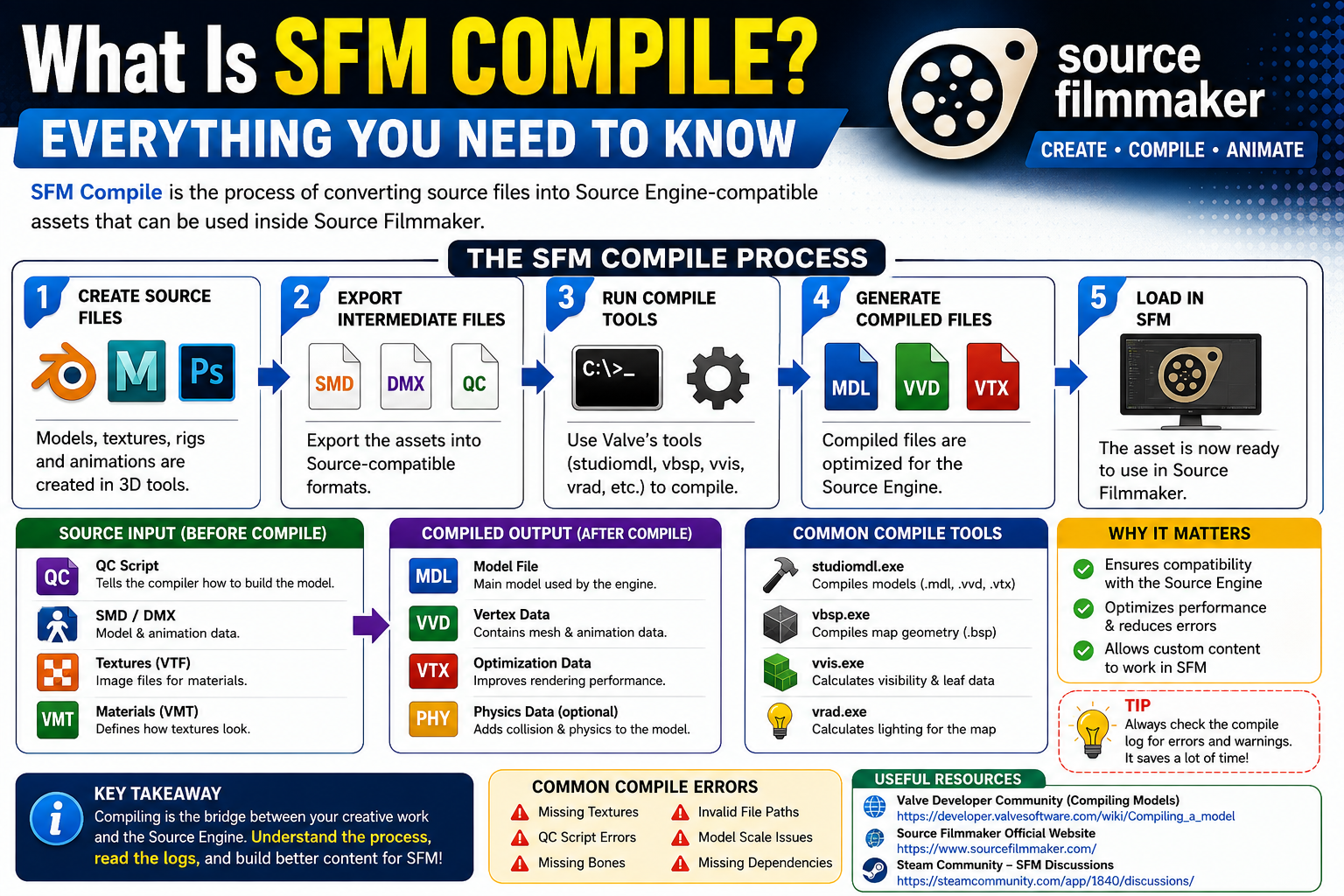
What Is SFM Compile? Everything You Need to Know
If you’ve searched “What Is SFM Compile? Everything You Need to Know,” you’re probably trying to understand one of the most confusing concepts in Source Filmmaker (SFM). Whether you’re creating custom models, importing maps, editing materials, or building animations, the compile process is a critical step that converts raw project files into formats SFM can actually use.
Many beginners assume compiling is simply “saving” a file, but that’s not how it works. Compiling transforms source assets—such as models, textures, animations, and maps—into optimized game-ready files that the Source Engine can load efficiently.
This article explains what SFM compile means, why it’s necessary, how the process works, common mistakes users make, and practical tips to avoid compilation errors. By the end, you’ll understand not only the basics but also several advanced details that many tutorials overlook.
What Is SFM Compile?
SFM Compile refers to the process of converting editable source files into compiled assets that Source Filmmaker (SFM) and the Source Engine can read and use.
Developers and creators work with source files such as:
- QC files
- SMD files
- DMX files
- VTF textures
- VMF map files
- Animation source files
These files aren’t directly usable inside SFM. They must first be processed by Valve’s compilation tools to generate formats like:
- MDL (Models)
- VVD (Vertex data)
- VTX (Hardware optimization)
- BSP (Compiled maps)
Without compiling, SFM cannot properly load custom assets.
Think of compiling as translating a document into another language. Your original files contain all the information, but SFM needs them in a specific format before it can understand them.
Why Is Compiling Necessary in Source Filmmaker?
Source Filmmaker was built on Valve’s Source Engine, which was designed around compiled assets rather than editable project files.
Compilation serves several important purposes:
- Converts assets into engine-compatible formats.
- Optimizes models for rendering performance.
- Creates collision and physics information.
- Compresses data for faster loading.
- Detects errors before assets are used.
- Organizes textures and materials correctly.
Without this process, large projects would load slowly, consume more memory, and become unstable.
How the SFM Compile Process Works
Although different asset types have unique workflows, the overall process follows a similar pattern.
Step 1: Create Source Files
Artists or modders create original assets using software such as:
- Blender
- Maya
- 3ds Max
- Photoshop
- Substance Painter
These programs produce editable files that contain geometry, textures, skeletons, and animations.
Step 2: Export Intermediate Files
The project is exported into Source-compatible formats such as:
- SMD
- DMX
- QC
- VMF
These files contain instructions describing how the asset should be compiled.
Step 3: Run Compile Tools
Valve provides several command-line utilities that perform the actual compilation.
Common examples include:
- studiomdl.exe (models)
- vbsp.exe (maps)
- vvis.exe (visibility calculations)
- vrad.exe (lighting)
Each tool has a specific role depending on the type of asset being created.
Step 4: Generate Compiled Files
After compilation, the tools produce optimized files that SFM recognizes.
For a model, this typically includes:
- MDL
- VVD
- VTX
- PHY (optional)
These files are then placed inside the appropriate game directory.
Step 5: Load the Asset in SFM
Once compilation finishes successfully, the new model, animation, or map becomes available inside Source Filmmaker.
If errors occurred during compilation, SFM may fail to display the asset correctly or refuse to load it altogether.
Types of Assets That Require Compilation
Not every file used in SFM follows the same workflow.
Models
Character models, props, weapons, and environmental objects all require model compilation before use.
Compiled output usually includes:
- MDL
- VVD
- VTX
Maps
Custom environments begin as VMF files.
They must pass through:
- VBSP
- VVIS
- VRAD
before becoming BSP map files.
Animations
Custom animations may require compilation depending on how they’re exported and integrated with models.
Materials
Textures often require conversion into Valve Texture Format (VTF), along with VMT material definition files.
Although this process differs slightly from model compilation, it’s still an essential preparation step.
SFM Compile vs. Export: What’s the Difference?
Many beginners confuse exporting with compiling.
| Exporting | Compiling |
|---|---|
| Saves work from a modeling program | Converts files into Source Engine format |
| Produces editable project data | Produces engine-ready files |
| Used during content creation | Used before importing into SFM |
| Can be reopened and edited | Intended for use inside the engine |
Exporting prepares your work. Compiling prepares it for the game engine.
Common SFM Compile Errors
Compilation isn’t always successful on the first attempt. Even experienced creators encounter errors.
Some of the most common include:
Missing Textures
Incorrect material paths often prevent textures from loading.
Missing Bones
Animation rigs may reference bones that don’t exist.
QC Script Errors
The QC file controls much of the compile process.
Even a single typo can stop compilation.
Invalid File Paths
Moving project folders after setup can break references.
Model Scale Problems
Incorrect export settings may create oversized or tiny models.
Missing Dependencies
Some projects rely on additional files that weren’t included during compilation.
How to Troubleshoot Compile Problems
Instead of guessing, use a structured approach.
Read the Compile Log
Compile logs often identify the exact line causing the issue.
Skipping the log is one of the biggest mistakes beginners make.
Check File Names
Avoid:
- Spaces
- Special characters
- Duplicate names
Consistent naming reduces errors significantly.
Verify Folder Structure
Source Engine expects assets in specific directories.
Even correct files may fail if stored in the wrong location.
Re-export Source Files
Sometimes the problem originates in Blender or another modeling application rather than the compiler itself.
Re-exporting often resolves hidden formatting issues.
Test Small Changes
Rather than changing everything at once, modify one issue and compile again.
This makes debugging much easier.
Benefits of Understanding SFM Compile
Learning the compile process provides several advantages.
- Faster troubleshooting
- Better project organization
- Improved asset compatibility
- Reduced loading problems
- Higher-quality custom models
- More efficient workflow
- Easier collaboration with other creators
Even if you primarily create animations, understanding compilation saves considerable time over the long term.
Why Beginners Often Struggle With SFM Compile
One overlooked reason is that many tutorials focus on which buttons to click rather than why each step exists.
As a result, users memorize procedures without understanding the underlying workflow.
When something changes—such as a file path or export setting—they no longer know how to diagnose the problem.
Learning the purpose of QC files, compile tools, and Source Engine formats creates a stronger foundation than following tutorials mechanically.







Bunny Hayler: Revealed Age and Family Story

Fappelo: What It Is, How It Works, and What You Should Know

From SeveredBytes.net Blog: A Clear Guide to Its Content
-

 Entertainment9 years ago
The final 6 ‘Game of Thrones’ episodes might feel like a full season
-
Fashion9 years ago
According to Dior Couture, this taboo fashion accessory is back
-

 lifestyle6 months ago
Creative Conference Room Ideas to Enhance Productivity and Collaboration in 2026
-
Entertainment9 years ago
The old and New Edition cast comes together to perform
-
Business9 years ago
The 9 worst mistakes you can ever make at work
-
Business9 years ago
Uber and Lyft are finally available in all of New York State
-
Entertainment9 years ago
Disney’s live-action Aladdin finally finds its stars
-
Sports9 years ago
Steph Curry finally got the contract he deserves from the Warriors